
Capstone B: export, deploy & Coach end-to-end
After this capstone you can export a model to a deployment format from Ship → Package, deploy a versioned endpoint with smoke and drift checks, and describe how the inline Coach notices guide the full lifecycle — then compare a platform run to your by-hand Track 2 run.
You merged and saved a model by hand in lesson 2.8 and noted that BrewSLM automates export to GGUF / ONNX / Hugging Face. Here's that stage — it lives under Ship in the workspace, four stages deep: Package, Publish, Deploy, Monitor — plus the Coach notices that have been implied behind every recommendation in this track.
10 Export — the merged artifact, productized
Export takes the trained model and a target format and produces an artifact bundle with weights, tokenizer, manifest, and a smoke-check trace. This is your merge_and_unload + save_pretrained from Track 2, with more targets and quantization tracked. In the workspace it is the New export form on Ship → Package (/project/<id>/ship?stage=package): pick the run, the format and the quantization; finished exports appear in the Releases table below the form.
formats:        GGUF (CPU) | ONNX | HuggingFace | TensorRT-LLM | Docker
quantization:   e.g. Q4_K_M for GGUF          # tracked so Ship → Package → Options → Compress
                                              # knows which variants exist
RunEvent: export (info)   payload: { format, output_path, file_size_bytes }
  on failure → export_run_failed | export_artifact_missing | export_quantization_failed
The format you pick follows Track 2's logic: a HuggingFace or Docker export for a GPU server, GGUF + a quant like Q4_K_M for CPU/edge. A completed HuggingFace export can go to the Hub from Ship → Publish; a LoRA run is merged into its base model on the way out, and merge + quantize on their own live under Ship → Package → Options → Compress.
11 Deploy (optional) — a versioned, watched endpoint
Deploy (Ship → Deploy) takes an export and a target (a vLLM endpoint, a local runner, a cloud burst) and produces a DeploymentVersion with promote / reject / rollback / drift-check actions; each served version's drift history sits with it on Ship → Deploy, and Ship → Monitor shows the run events and failure clusters. Two safety mechanisms matter:
- Smoke check at promote time — a quick sanity pass before traffic hits the version.
- Drift check, re-run on your cadence — it re-runs your answer key (the gold set, kept under Data → Labels) against the deployed model (you paste its predictions on Ship → Deploy, or the API calls an endpoint URL) and compares with the training-time baseline; run it weekly or after any infra change, so quality regressions in production are caught, not discovered by users. Your Track 1 gold set keeps working long after training.
Failures are named events too: deployment_smoke_failed, deployment_drift_detected, deployment_promote_blocked.
Coach notices — the through-line
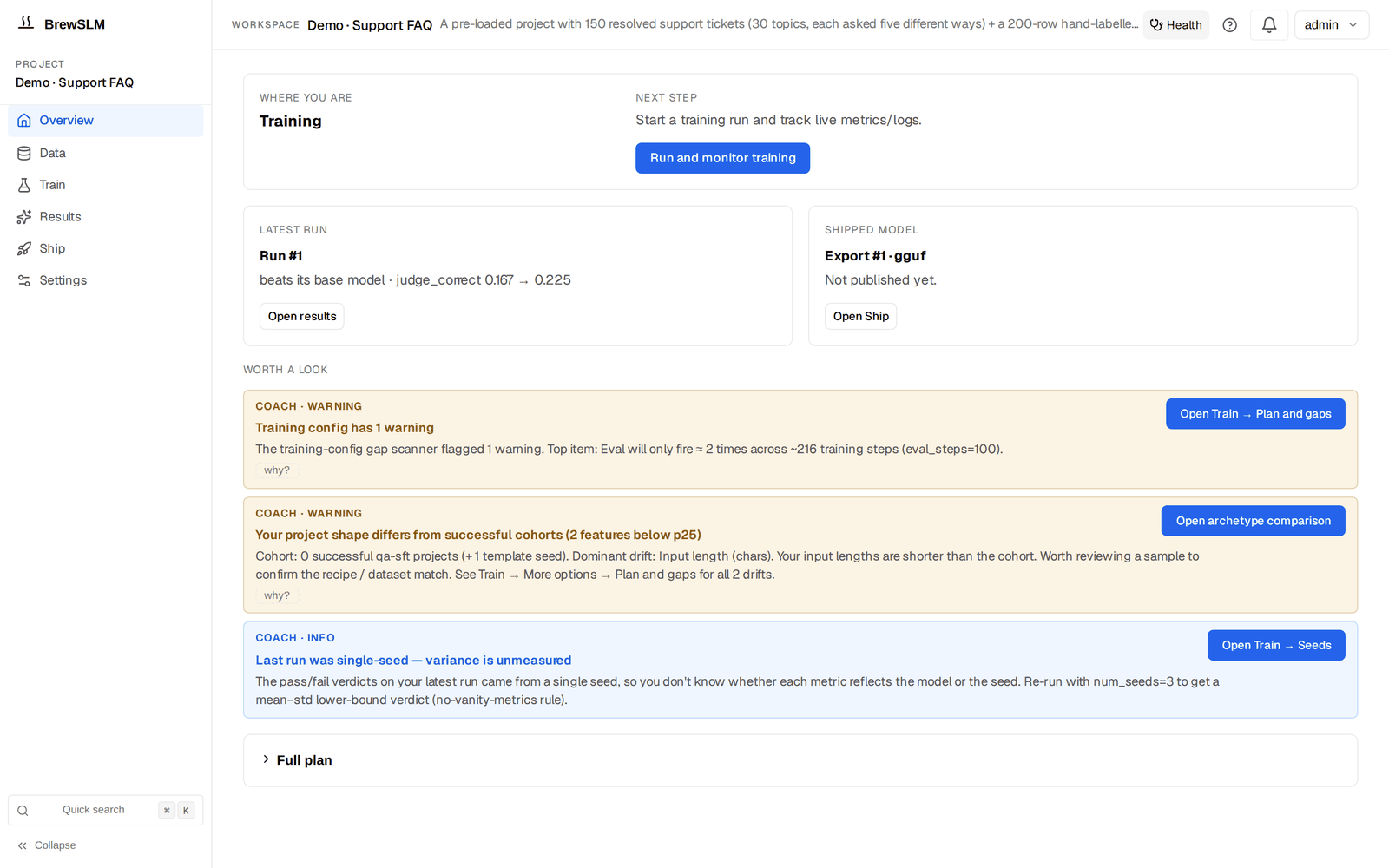
Throughout this track, each "what next?" had an answer: review these pending rows, your gate isn't met, augment from this cluster, consider RAG. The backend's Coach service emits those stage suggestions (data / cleaning / gold_set / synthetic / dataprep / training / eval / export) and offers actions — navigate, run_playbook, augment_from_cluster, start_flow, reroute_to_rag — so you're never staring at a project wondering what to do. There is no separate Coach bar or toggle any more: each suggestion renders inline as a "Coach · info / warning / critical" notice on the destination it belongs to (Data per step, Train, Results, Ship), with its action button, a "why?" trace and an × that dismisses it; the Overview shows up to three under Worth a look. Settings → Show inline tips switches them off for a project. It's the eleven-stage lifecycle, narrated where you are standing.
Capstone B — run it through the platform
Take the same sentiment task you fine-tuned by hand and run it through BrewSLM end-to-end:
1. + New Project on SmolLM2-135M-Instruct (lands on the Overview).
2. Data → Sources: Import dataset (your file, or hf:imdb) → introspect → dry-run → commit.
3. Data → Generate: top up with a synthetic playbook; clear the review queue (Details).
4. Data → Labels: confirm the task shape = classification; Data → Split: build the splits.
5. Train → More options → LoRA and advanced training (r=16, lr=2e-4, 3 epochs, bf16).
6. Train: the readiness line must read "Ready to train" — clear any blockers (Checks / Plan and gaps).
7. Train → press Train → Launch; follow the run in the bell and the runs list below the form.
8. Results → Verdict: evaluate on the test examples (rule: accuracy >= 0.90); Results → Failures: read the clusters.
9. If knowledge-bound failures dominate → Results → Compare (auto-RAG) / the reroute notice.
10. Ship → Package: New export (GGUF Q4_K_M) → Ship → Deploy → confirm the smoke check passes.
What the platform bought you
Same pipeline, same model, same data as your by-hand run — but now with per-row import accountability, a reviewed synthetic top-up, a reproducible manifest, a preflight forecast, a watched training Job, enforceable pass/fail rules, clustered failures with remediation, a retrieval escape hatch, and a versioned endpoint with drift detection. You did it once by hand to understand it; the platform does it repeatably, auditably, and at scale.
That completes the BrewSLM lifecycle, end to end. You can now do this work by hand and drive the platform with full understanding of what each surface is doing underneath. Track 4 goes deeper — the advanced topics (distillation, preference tuning, quantization, multi-task) that build on this foundation.
Key terms
- Export formats
- GGUF (CPU) / ONNX / HuggingFace / TensorRT-LLM / Docker — the target the artifact bundle is built for; chosen in the New export form on Ship → Package.
- quantization variants
- Compressed variants such as Q4_K_M, tracked so Ship → Package → Options → Compress knows what's available.
- DeploymentVersion
- A versioned deployment with promote / reject / rollback / drift-check actions.
- drift check
- An on-demand re-run of the answer key (gold set) against the deployed model, compared with the training-time baseline, to catch production regressions; run and read on Ship → Deploy.
- Coach notices
- The stage suggestions and actions (navigate, run_playbook, augment_from_cluster, start_flow, reroute_to_rag) the Coach service emits, rendered inline on each destination and under the Overview's "Worth a look".
Check yourself
Answers are saved to this browser.