
Synthetic data and the review queue
After this lesson you can generate synthetic training data with a playbook, work the review queue of pending rows, and bulk-drop rejected rows by reason instead of accepting or discarding everything.
Your Track 2 dataset had a comment: # ... in practice, hundreds more rows. Producing those rows — covering the hard cases, keeping balance — is real work. BrewSLM's synthetic-data surface generates candidates and routes them through review so quantity never costs you quality.
Recipe-aware playbooks
A synthetic playbook generates rows that match your project's task shape and scoring mode — not generic text, but examples shaped like the ones the model will be scored on. The surface is Data → Generate (/project/<id>/data?step=synthetic): pick a Generation Mode (Single-turn Q&A, Multi-turn, or span extraction), a provider and model (a local Ollama model first), the source text, and how many pairs; the playbook catalogue and its last runs sit in the step's Details drawer (Playbook center). Generation runs as a background Job (the same jobs framework that powers training and RAG comparison), so a large batch doesn't block the request; the notification bell tracks it to completion.
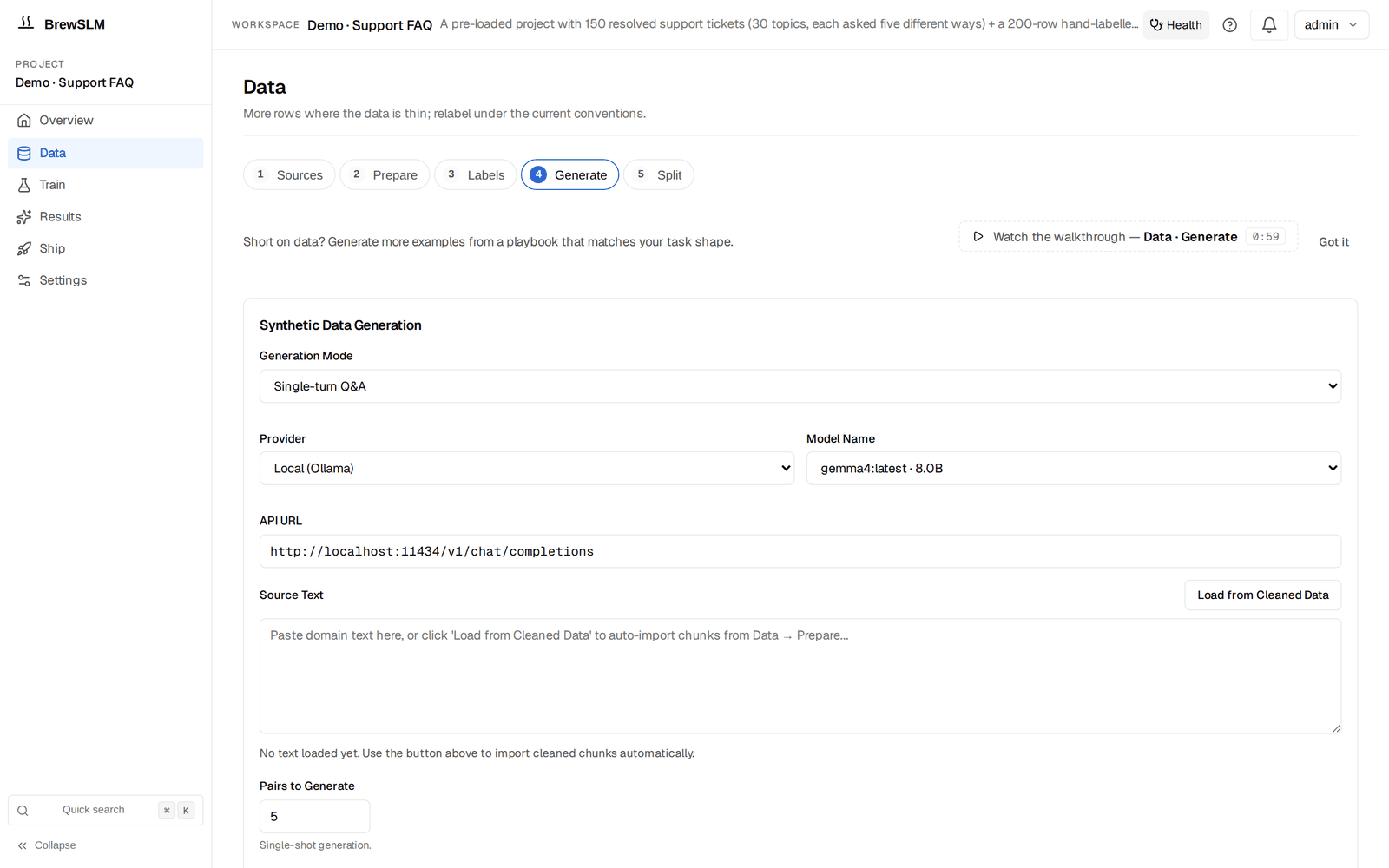
Nothing lands trusted: review_status = pending
Every generated row arrives with review_status="pending" and is written to the project's synthetic JSONL. It is not training data yet. This is the platform enforcing a Track 1 rule — never train on data you haven't looked at — as a workflow, not a good intention.
# a generated row, awaiting review
{ "prompt": "Classify the sentiment ...: shipping was slow but the product is great",
  "completion": "positive",
  "review_status": "pending",
  "synth_source": "playbook:classification:positives_paraphrase",
  "synth_confidence": 0.82 }
Provenance on every picked row
Notice the synth_source and synth_confidence. The review queue groups rows by synth_source, so you can trace a bad example back to the playbook that made it — and accept or reject that whole group at once.
Work the review queue
The queue is under Data → Labels → Details → Review queue (/project/<id>/data?step=goldset&open=review-queue); pending rows are grouped by their synth_source, and each group has Accept all / Reject all next to per-row triage. You approve the good ones (they become trainable), and reject the rest. Rejected rows aren't dumped wholesale — rejection is soft, they're grouped by reason and individually selectable, so you can bulk-drop "label ambiguous" while keeping "minor typo" rows you'll fix. Training reads skip both pending and rejected rows. This is the same rejected-rows-are-selectable pattern from the import dry-run, applied to generation.
A no-op is not a success
If a generation run produces zero usable rows, the Job fails loudly with a diagnostic rather than reporting a cheerful "Done." A silent empty result would mislead you into thinking you have data you don't. Honest failure beats a green checkmark over nothing.
Approved synthetic rows join your imported rows as candidate training data. Before any of it trains, it has to be cleaned and split into the manifest (Data → Prepare, Data → Split) — the next lesson.
Key idea
Synthetic data scales your dataset; the review queue keeps it honest. Rows land as pending, carry provenance, and are approved or bulk-dropped by reason — so more data never silently means worse data.
Key terms
- synthetic playbook
- A recipe-aware generator that produces rows matching the project's task shape and scoring mode.
- review_status = pending
- The state every generated row starts in; not trainable until reviewed.
- review queue
- The triage surface where pending rows are approved or rejected (Data → Labels → Details → Review queue).
- bulk-drop by reason
- Rejecting groups of rows by their reason code instead of all-or-nothing.
- synth_source / synth_confidence
- Provenance fields: which playbook produced a row (the review queue groups by it) and how confident the generator was.
Check yourself
Answers are saved to this browser.