
Invoice field extraction with the span-extraction recipe
By the end of this tutorial you'll have a small language model that takes free-form invoice text and emits a JSON object naming the vendor, total, line items, invoice date, and due date — with character offsets for every span so your downstream system can audit exactly which tokens produced each value. It runs on a single small GPU (or CPU), survives layout changes that would break a regex, and deploys as an inline microservice on every invoice ingest.
Before you start
This tutorial assumes BrewSLM is running locally at http://localhost:5173 with an admin user signed in. If you haven't done that yet, complete Tutorial 0 — Set up BrewSLM and your first project first. It takes ~15 minutes and is the prerequisite for every tutorial in this track.
You'll also want, before you start: ~100 invoice texts (OCR'd from your AP scans, exported from your ERP, or sampled from FUNSD / CORD — see below) plus the corresponding ERP entries for vendor, total, and dates. The ERP entries are what bootstrap your gold spans so you're not annotating from scratch.
Terms you'll see in this tutorial (click to expand)
- Recipe
- The training-plan template behind a project. For this tutorial:
span-extraction(shown in the app as the task type Structured Span Extractor / Extract structured fields). Defines the base model + adapter + pass/fail-rule defaults for structured-extraction tasks. - Answer key
- BrewSLM's name for the gold set — the trusted rows every run is scored against. It lives under Data → Labels (the Answer key card). This tutorial says "answer key" for the thing in the app and "gold" for the idea.
- Adapter
- The mapping layer that converts your CSV/JSONL rows into training-ready fields. For span-extraction the adapter is
default-canonical— it readstextplus a JSON list of{type, start, end, text}entity objects. - Task profile
- The shape category the platform uses to pick eval handlers + synth playbooks. Span-extraction's task profile is
structured_extraction— different fromclassification(one label per row) and fromrag_qa(free-text answer). - Scoring mode
- How the eval handler compares prediction to gold. Span-extraction uses
span_set— the prediction and gold are each sets of(type, start, end)tuples, and the score is the F1 of set overlap. This is NOT the same asfield_match(which would require an exact-string match on a single field). - Entity
- One tagged span in a row. For invoices:
vendor,total,line_item,invoice_date,due_date. Every entity is a tuple of (type, character-start-offset, character-end-offset, raw-text). - Span-set F1
- The headline metric. Precision = correctly-predicted entities / total predicted; recall = correctly-predicted entities / total in gold; F1 = harmonic mean. An entity is "correct" only when type AND offsets both match.
- Per-entity-type precision
- The same precision metric, sliced per entity type. For invoice extraction you'll set a tighter precision floor on
total(a wrong total causes a wrong payment) than online_item(one missed line item is recoverable downstream). - Stratified-by-template split
- Train/val/test split where each split contains different invoice templates (vendors, layouts). Prevents the model from memorising a specific layout and pretending it generalises.
This is BrewSLM's canonical workflow for structured extraction from free-form text — pulling named fields out of documents where the position, formatting, and surrounding context all vary. Invoice extraction is the headline use case but the recipe shape generalises: pulling named-entity offsets from contracts, statements, receipts, purchase orders, expense reports, ID documents. The model learns which tokens carry each field; you don't have to re-write your regex stack every time a vendor changes their template.
The end state is the small model you'd actually run in production at a B2B finance team: small enough to deploy as middleware on the ingest path, accurate enough that AP staff stop double-checking every extraction, and honest enough about its uncertainty that low-confidence rows route to a human reviewer instead of straight into the ERP.
What you'll build
A span-extraction model that takes invoice text and returns a JSON object with five entity types and their character offsets. Concretely, given an input like:
ACME Office Supplies Co
Invoice #INV-2026-00471
Bill Date: 2026-05-12   Due: 2026-06-11

Item                  Qty   Unit    Total
Premium copy paper     20   12.00   240.00
Stapler — heavy duty    3   18.00    54.00
Box of ballpoint pens   8    4.50    36.00

                                     ------
                            TOTAL:  $330.00
… the model emits:
{
  "entities": [
    {"type": "vendor",       "start": 0,   "end": 23,  "text": "ACME Office Supplies Co"},
    {"type": "invoice_date", "start": 67,  "end": 77,  "text": "2026-05-12"},
    {"type": "due_date",     "start": 84,  "end": 94,  "text": "2026-06-11"},
    {"type": "line_item",    "start": 140, "end": 178, "text": "Premium copy paper     20   12.00   240.00"},
    {"type": "line_item",    "start": 179, "end": 217, "text": "Stapler — heavy duty    3   18.00    54.00"},
    {"type": "line_item",    "start": 218, "end": 257, "text": "Box of ballpoint pens   8    4.50    36.00"},
    {"type": "total",        "start": 311, "end": 318, "text": "$330.00"}
  ]
}
The model is a fine-tuned LoRA adapter on top of SmolLM2-135M-Instruct running at typical 20-80ms per invoice on a single GPU. The output is a clean JSON object — your AP automation calls the microservice, gets back the structured fields, posts them straight to the ERP for any invoice it's confident about, and routes the rest to a human queue.
Key idea
A span-extraction model knows which tokens are the value, not just that a value exists. That's why character offsets are first-class — your downstream system can highlight the exact bytes that produced "$330.00" in the original document, audit trails get cheap, and a bad extraction is a fixable bad extraction rather than a black box.
Why not regex (and why not a frontier LLM API)
Three options exist for invoice field extraction. Use this comparison:
| Approach | Layout robustness | Latency | Cost at 10k invoices/day | Privacy |
|---|---|---|---|---|
| Regex / rule-based extractors | Breaks every time a vendor changes template; rules accrete forever | <5ms | Free (but a full-time eng to maintain) | Self-hosted |
| Frontier LLM via API | Excellent — handles novel layouts | 1.5-4 seconds per invoice | ~$300-$2,000/month per 10k invoices/day, depending on token volume | Every invoice (with PII + financial data) leaves your network |
| Small fine-tuned span extractor (this tutorial) | Good across templates if you train on layout diversity | 20-80ms per invoice | ~$30/month (one GPU, amortised) | Self-hosted, audit-ready |
Regex was the right answer in 2015. It stopped being the right answer the day your sixth vendor sent an invoice that put the total in a top-right corner instead of a bottom-right one, and your seventh vendor decided that "Bill Date" meant something different from "Invoice Date". Every new template adds a rule; every rule rots when the vendor tweaks their template; the regex stack grows monotonically until nobody on the team can change it without breaking three things.
Frontier-LLM-via-API solves the layout problem but costs money per call, adds 1-4 seconds of latency to every ingest, and ships your customers' invoice data (vendor names, line items, totals — material non-public financial info) to a third-party. For most finance teams that's a regulatory non-starter even before the cost shows up on the bill.
Small fine-tuned models occupy the gap: layout-robust like an LLM, fast and self-hosted like a regex.
Why span-extraction, not classification or QA?
Within BrewSLM you have three obvious recipes you could point at this problem. Pick the one that matches the question you actually need answered:
- classification would tell you "is this a valid invoice?" — one label per document. Useful for triage; doesn't extract any fields.
- qa-sft would let you ask "what's the total?" in free text and get a free-text answer back. Useful for analyst tooling; not structured enough for a downstream system to consume without parsing the answer.
- span-extraction tells you which tokens in the document are the vendor, the total, each line item, the dates — with character offsets. That's the shape an AP automation system actually wants.
You need WHICH tokens, not just IS this an invoice. That's the span-extraction signature.
Choose your dataset
You need invoice text paired with the entity spans you want extracted. Four common starting points; mix and match:
- Your own AP system (the spine)
- The highest-signal data you can get. Export 100-300 recent invoices as plain text (PDF → OCR if you have to) paired with the ERP entries that captured vendor / total / dates. Your gold spans bootstrap from those ERP entries — see the gold-set section. This is the work that actually matters; everything else is volume.
- FUNSD — Form Understanding in Noisy Scanned Documents
- FUNSD ships 199 fully-annotated scanned forms with per-token labels and bounding boxes. Small but high-quality — useful for validating the workflow and for diversifying your gold set with non-invoice form layouts.
- CORD — Consolidated Receipt Dataset
- CORD has 1,000 receipt images with structured-field annotations (menu items, totals, sub-totals, taxes). Closer to your invoice domain than FUNSD; use it to seed line-item examples.
- DocBank — large-scale document layout
- DocBank is 500K+ documents with token-level layout annotations. Overkill for an invoice extractor, but useful as a pre-training corpus if you decide to swap to a larger base model later.
Public data is for diversity, not coverage
Your AP system's invoices are what your model will see in production. FUNSD and CORD round out template diversity so the model doesn't memorise your top three vendors. Treat them as a 20-30% supplement to your own data — never the spine. A model trained 100% on CORD receipts will be brilliant at coffee shop receipts and useless at your actual vendor invoices.
Ingest and map
In BrewSLM, create a new project: Projects → + New Project, give it a name and describe the job in What problem do you want this model to solve? ("extract vendor, total, line items and dates from invoice text, with character offsets"). The project opens on its Overview. Then pin the task shape: Data → Labels → What kind of task is this? → Change → Extract structured fields (the span-extraction recipe; Train → More options → Task type → Structured Span Extractor → Use this task type is the same switch). Confirming it sets the adapter (default-canonical), task profile (structured_extraction) and the scaffolded pass/fail rule set (span-set F1 + precision + recall).
Open Data → Sources → Import dataset (auto-mapping) → Import dataset →. The wizard walks Source → Task type → Map → Preview & Confirm; point it at your JSONL. The canonical span-extraction shape is:
{
  "text": "ACME Office Supplies Co\nInvoice #INV-2026-00471\nBill Date: 2026-05-12   Due: 2026-06-11\n\nTOTAL: $330.00",
  "entities": [
    {"type": "vendor",       "start": 0,   "end": 23,  "text": "ACME Office Supplies Co"},
    {"type": "invoice_date", "start": 41,  "end": 51,  "text": "2026-05-12"},
    {"type": "due_date",     "start": 58,  "end": 68,  "text": "2026-06-11"},
    {"type": "total",        "start": 78,  "end": 85,  "text": "$330.00"}
  ],
  "rationale": "Standard layout; date label is 'Bill Date' rather than 'Invoice Date'."
}
Two required fields: text (the full invoice text) and entities (a JSON array of {type, start, end, text} objects). The optional rationale is a free-text note about what edge case this row exercises — useful for you as a reviewer, ignored by the trainer.
The wizard's Map step scans your file's columns and proposes the mapping. For JSONL with the canonical shape it usually picks the right fields automatically. Preview & Confirm shows the accepted sample rows (and the rejected ones, grouped by reason); click Import N row(s) to project when the preview looks right.
✓ Checkpoint: Data → Sources lists the import (Details → Sources summary shows the row count per source, e.g. "147 rows"). The app doesn't tally rows per entity type at import, so do it yourself with a one-liner over the JSONL — how many rows have at least one vendor span, how many have a total, etc. If any entity type has under 30 rows, you'll need more answer-key rows for that type before training; the Readiness overview ledger (same Details drawer) flags thin data on its data_ready row.
Character offsets must match the text exactly
The start and end values are byte (well, codepoint) offsets into the text field. If you copy-paste an invoice from a PDF into the answer-key form and the PDF inserted U+00A0 (non-breaking space) where you expected a regular space, your offsets will be off by some N and the eval handler will score every prediction wrong. The Data → Prepare step (next section) normalises whitespace; do it before you annotate, not after.
Cleanup: OCR artefacts and currency normalisation
Open Data → Prepare (chunk size, Redact PII & Secrets, Clean All Documents; one-click autofixes for the common cases) and its Details → Quality and safety section. For invoice text you're cleaning four common artefact families:
- OCR ligatures and stray characters. "fi" → "fi", "rn" → "m", "0" → "O". The platform's deterministic scan flags rows containing common OCR-failure substrings. Review the candidates; the cleanup recipe applies a normalisation pass that's safe to auto-run on the whole corpus.
- Currency formatting. "$1,234.56" vs "USD 1234.56" vs "1.234,56 €" (European notation) vs "Rs 1,234/-". Pick one normalised form (the platform default is "$1234.56" with no thousand separators) and apply it across your corpus. If you don't normalise, every variant becomes a distinct token sequence the model has to learn separately.
- Multi-page invoices. If your AP scans produce multi-page PDFs joined into one OCR'd text blob, split them at page-break markers. Each page becomes its own row. The model handles ~2,000 tokens of context comfortably; a 12-page invoice with 9,000 tokens will get truncated mid-document and your line-item recall will tank.
- Header / footer noise. "Page 1 of 3", scanner-generated timestamps, the URL of the form you downloaded the invoice template from. Strip these. They contain dates and numbers that look like invoice dates and totals — and they are the single biggest source of label-drift you'll see in production.
You don't have to clean everything before training. You do have to clean the rows you're about to put in the answer key — those are the rows the pass/fail rules score against, and their offsets need to be exact.
Pick the recipe: span-extraction or something else?
The decision tree for invoice extraction:
| You want… | Use | Why |
|---|---|---|
| Character offsets for every extracted field | span-extraction | JSON list of {type, start, end, text}; downstream system can audit + highlight |
| A yes/no flag on whether a document is an invoice at all | classification | One label per document; useful for ingest triage, not extraction |
| A free-text answer to "what's the total on this invoice?" | qa-sft or rag-protocol | Conversational; not structured enough for an ERP integration |
| An executive summary of each invoice | summarization | Different shape entirely |
| Extract fields + flag fraud risk in one pass | span-extraction first, then a small classifier downstream | Two narrow models compose better than one wide one |
For the canonical AP-automation use case: span-extraction. Sticking with it for the rest of this tutorial.
Domain packs (the finance gap)
BrewSLM doesn't ship a finance-domain pack out of the box today — the curated packs (support, ecommerce, legal, healthcare; Settings → Tools → Domain Packs) are around content domains, not finance/AP workflows. For invoice extraction you're operating on the generic cleaning recipe defaults plus the span-extraction recipe defaults, which is fine for a first project.
Building a custom finance pack is a worthwhile follow-up that this tutorial intentionally doesn't cover. It would bundle: stricter precision floors on total and due_date (the entities whose errors cause real-world payment failures), currency normalisation recipes for your operating regions, a glossary linking eval gates to SOX / regulatory-control language, and an Academy tag pointing at this tutorial. If your team is shipping multiple AP extractors (invoices, purchase orders, statements), packaging the conventions as a domain pack pays back fast.
Build the answer key (gold set) — manual spans + LLM-assisted promotion
The answer key — BrewSLM's name for the gold set — is where this tutorial diverges most from tutorial 2. Classification gold is a yes/no label per row; span-extraction gold is a list of typed spans per row, each with exact character offsets. Two complementary paths:
Path A — manual span tagging
Open Data → Labels. The Answer key card holds it (Practice answer key / Final answer key picker, Lock), and for this task shape its add-entry form is in span mode. For each row:
- Paste the invoice text into the
textfield — verbatim, already cleaned of OCR artefacts. - For each field you want extracted, highlight the span in the text, type its entity type (
vendor/total/line_item/invoice_date/due_date) and click + Add highlighted span. The form appends{type, start, end, text}to the entities JSON and writes the character offsets for you. - Add a one-line
rationaleif the row covers a weird edge case ("Date label is 'Bill Date' not 'Invoice Date'", "Total is split across two lines"). The rationale isn't used for training but it's invaluable when a future you is debugging an eval failure six weeks from now.
Spend an hour here. Aim for 150 gold rows minimum — invoices vary more than classification inputs, and the model needs diversity across templates to generalise. Quality beats volume but coverage of edge cases beats quality on a single template.
Path B — LLM-assisted promotion from ERP records
This is the highest-leverage path if you have an existing ERP. Your AP system already knows the vendor, total, and dates for every paid invoice — those are the gold values for three of the five entity types. A short script plus the import wizard turns this into a 30-minute job:
- Bulk-import your invoice texts as raw rows.
- Join each row with its ERP entry — supply (vendor_name, total_amount, invoice_date, due_date) alongside the invoice text in your import file.
- Run a teacher model (Ollama / OpenAI / Anthropic) via a small script that feeds it each (invoice text, ERP values) pair and asks the teacher to locate each ERP value inside the invoice text and emit the corresponding span offsets in the platform's canonical entity-JSON shape. Use the platform's API key + a quick script — there's no built-in "seed-from-metadata" UI for this flow today; it's straight backend scripting against the synth backend you've configured. (Line items, which the ERP usually doesn't itemise, you still tag by hand.)
- Import the teacher's output through Data → Sources → Import dataset. The rows land as pending synthetic rows in the Review queue (Data → Generate → Details → Review queue). Accept the good ones — they become training rows; the ones you want to score against, add to the answer key on Data → Labels.
This trades 4-6 hours of manual offset-tagging for 30 minutes of review. The trade-off is the same as in tutorial 1: you have to actually review the rows. The platform will not auto-accept LLM-generated rows; every acceptance is an explicit decision.
✓ Checkpoint: the Answer key card on Data → Labels shows your row count, and the Readiness overview ledger (Data → Sources → Details) turns its gold_set row green once you're past the recipe's recommended count (amber below it, e.g. "60 rows · 150 recommended"). The amber state is fine for now — you'll grow it with synth in the next sections. Tally rows per entity type yourself: every entity type should have at least 30 examples in the answer key. If due_date is sitting at 8 rows because half your invoices have "Net 30" instead of an explicit due date, that's signal — you need more rows with explicit due dates AND a few rows with "Net 30" labeled correctly.
Don't skip the "no due date" examples
Your answer key must contain rows where some fields are legitimately absent — invoices with no due date, invoices with no itemised line items, statements with no single "total" line. The model needs to learn that absence is a valid output (an empty entity list for that type), not a hallucination cue. Without these rows in gold, the model will invent a due date for every invoice and your span-set precision tanks.
Stratified split by invoice template
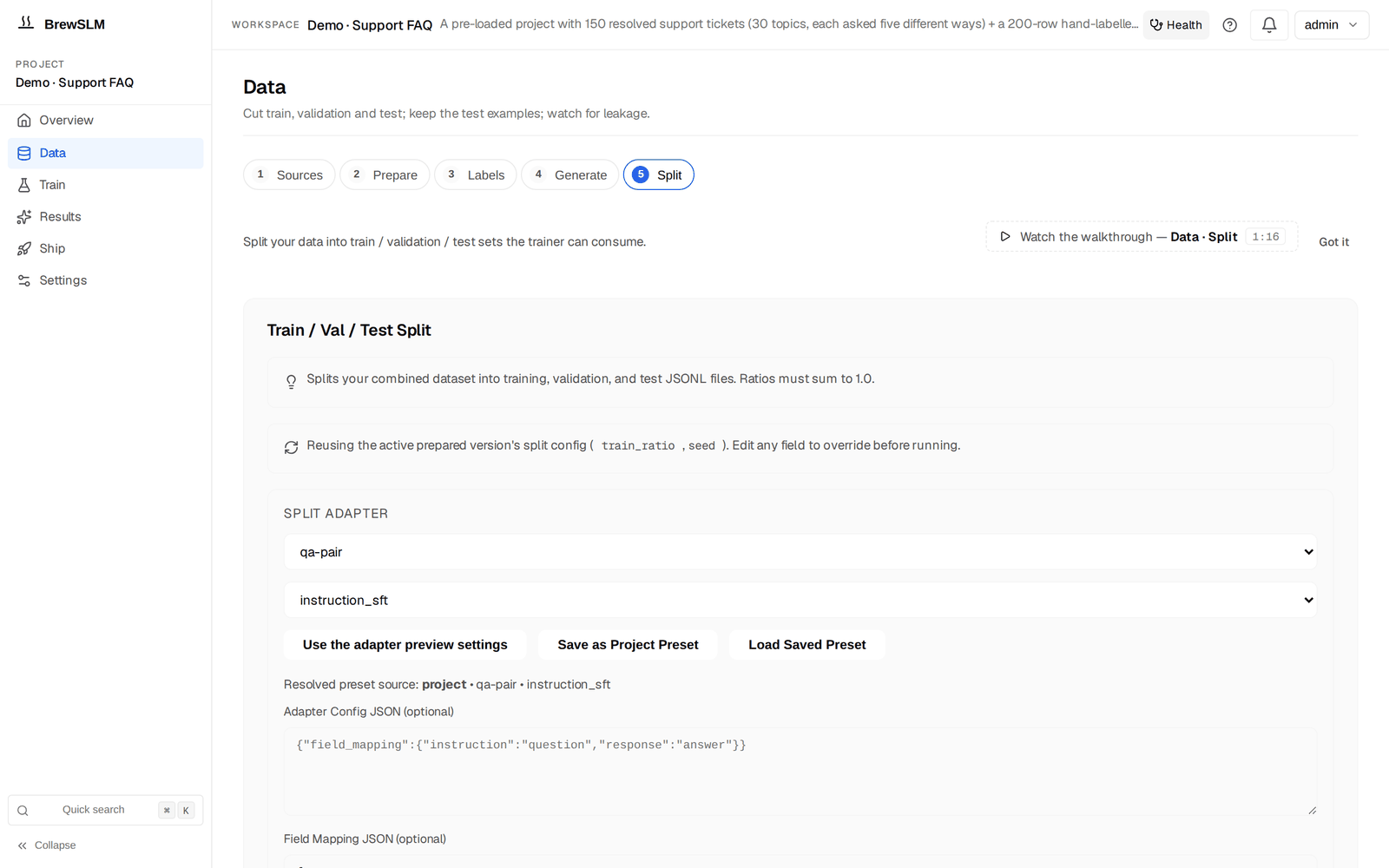
Data → Split (the Train / Val / Test Split form) cuts the split when you click Run Split. For span-extraction on invoices, one override is non-negotiable:
- Split disjointly by template, not by row. Random splitting puts the same vendor's invoices into both train and test, and a 95% F1 on the test set just means the model memorised that vendor's layout. On Data → Split, set Disjoint By Field (optional) to your vendor / template column (e.g.
template_id). The split groups rows by that field's value and assigns each group whole to exactly one split — train, val, and test will share no template IDs. The manifest's "Disjoint by" panel shows per-split group + row counts plus the ratio drift (|actual − target|) so you can see how close the greedy bin-packing landed to your 80/10/10 target. Note: this is different from stratify-by (preserve per-class ratios across splits); disjoint-by is the right primitive for "same key shouldn't appear in both train and test". - Reserve a held-out new-template test set if you can. Set aside 20-30 invoices from vendors that appear nowhere else in the corpus and import them as an external benchmark (Results → Compare → External benchmarks: a JSONL under the project's imports, scored against whichever run you pick and kept out of the main results). Per-vendor F1 on the random-split test answers "did the model learn each vendor's layout?"; per-row F1 on the new-template held-out set answers "will the model survive your next new vendor?". Those are different questions and you need both.
For 250 rows across 12 vendors, an 80/10/10 disjoint split produces roughly 200 train / 25 val / 25 test with no template shared between splits. The 20-row new-vendor benchmark lives separately and is your tripwire for template generalisation. On every later re-split tick Keep the current N test examples so new data never moves the answer key into training.
Generate paraphrase + hard-negative drills
Three playbooks matter here (Data → Generate → Details → Playbooks). For invoice extraction the headline ones are paraphrase and hard-negatives:
- Paraphrase positives (
POSITIVES_PARAPHRASE) — coverage extender - Vary the surrounding text of a gold row while keeping every entity span verbatim. New header, different vendor address line, a re-ordered set of preamble fields, but "$330.00" still appears in the same form and gets re-tagged at its new offset. Goal: the model learns to find the entity regardless of what surrounds it. Generate ~80 rows seeded from your manually-curated gold.
- Hard negatives (
HARD_NEGATIVES) — the precision-defender drill - Look-alike strings that AREN'T the target entity. The most useful hard-negative class for invoices is dates in headers vs the invoice date: scanner output that includes a "downloaded on 2026-04-02" timestamp at the top of the page, OR an order date elsewhere in the document, where the model needs to learn that those are not the invoice_date. Same for totals — "subtotal", "tax", "shipping", "amount due", and "total" all look like total candidates. The hard-negatives playbook generates rows where these look-alikes are present but the correct entity is somewhere else. Generate ~50 rows.
- Target a failure cluster (
CLUSTER_TARGETED) — fill the under-performing slice - After a first round of eval surfaces failure clusters, this playbook seeds new examples from rows in the worst-performing cluster. Optional — only run after your first training pass produces an eval result with non-trivial failure clusters. The failure clusters on Results → Failures launch it directly (Generate N rows from this cluster).
Open Data → Generate. Set Generation Mode to PII / NER span extraction (the span mode — the name says PII, the entity types are yours: vendor, total, line_item, invoice_date, due_date), pick a Provider (Local (Ollama) is the free default) and Model Name, then open Details → Playbooks and run Paraphrase positives first with a target of 80. Generation runs as a background Job; the notification bell tracks progress and pings when it finishes. The span mode also carries the span tools (Refine weak types, Write answer key with <model>, labelling conventions, Add a type) — Tutorial 7 uses them in anger.
Run paraphrase before hard-negatives
Unlike the classification tutorial — where hard-negatives are the precision spine and run first — span-extraction starts with paraphrase because the model has to learn where entities live across layouts before it can learn what NOT to grab. Run paraphrase to ~80 rows, review them, train a quick baseline. Then run hard-negatives, review, retrain. Two cycles, not one giant generation pass.
Review the synth queue
Every generated row lands pending in the Review queue (Data → Generate → Details → Review queue). The queue groups rows by the source that produced them so you can review one category at a time; tick rows and use Accept selected / Reject selected (the Review queue under Data → Labels → Details has Accept all / Reject all per source group). Per-row actions:
- Accept — the row joins the training corpus on the next split. For span-extraction specifically: check that each span's offsets slice to the right text so you can spot label-drift in seconds.
- Reject (soft) — the row is soft-rejected with an optional reason. The platform supports reason tags; for span-extraction the most useful ones are
offset-drift(offsets don't match the text),missing-entity(gold should have tagged a span but didn't),wrong-type(the right span tagged with the wrong type),not-an-invoice(the teacher generated a non-invoice). The row stays on disk for audit. - Purge this reason — physically deletes the rejected rows under one reason. Use it once you're confident the rejected pile under that reason is genuinely bad data. The queue groups rejected rows by reason so you can purge "offset-drift" rows without touching "wrong-type" rows.
Expect to reject 20-30% of paraphrase rows and 30-50% of hard-negative rows on first pass. Hard negatives are harder for the teacher to get right — that's not a bug, it's why you're reviewing them.
✓ Checkpoint: after a review pass, the Review queue should show no pending rows ("accepted: 120 · rejected: 40 · pending: 0" or similar). Pending and rejected rows never reach training — the next split silently skips them — so clear the queue before training.
Training configuration
Open Train. It is one form — Base model (+ Browse), Task, Seeds, Run name, a readiness line and the Train button (a confirm dialog shows the resolved config, then Launch); the knobs below live under More options → Model and hyperparameters (epochs, batch size, learning rate, Task Type) and LoRA and advanced training. The recipe defaults are sensible — for a first run, accept all of them:
- Base model
HuggingFaceTB/SmolLM2-135M-Instruct. Small, instruction-tuned, runs on consumer hardware. The recipe trains the model to emit a JSON entity array as its output — the same LM head produces the structured output token-by-token, no separate extractive head is wired in. Alternative:Qwen/Qwen2.5-0.5B-Instructfor slightly better quality at 4x the size.- Adapter
- LoRA, rank 16, alpha 32; leave target modules on
auto(all linear layers for a model this size). Standard for small models. The structured-extraction adapter wraps each row's text + entities into a prompt + reference-completion pair so the model learns to generate well-formed JSON as its answer. - Learning rate
- 2e-4 for the LoRA. Standard for SmolLM2 on structured-output tasks; the model's small parameter count tolerates the higher rate.
- Epochs
- 4. Span-extraction needs slightly more epochs than QA SFT because there are more output decisions per row (one per entity) and the head is fresh. Five epochs starts to overfit on small sets; three usually under-fits. (An empty field lets the app size epochs to your row count.) If you'd rather train an encoder tagger with exact offsets, set Task Type to Token classification (spans with exact offsets) and pick a DeBERTa / BERT-class base — see Tutorial 7.
- Batch size + gradient accumulation
- Batch 4, accumulate 4 → effective batch 16. Invoices can be 800-2,000 tokens, longer than classification inputs, so memory is more of a constraint. Adjust down on GPUs under 8 GB.
Expected runtime: 10-25 minutes on a single GPU (RTX 3060 or better), 30-60 minutes on CPU. The runs list under the form shows live loss and the validation metrics as sparklines, with a Cancel button on the running run; if F1 plateaus below 0.50 by epoch 2, cancel and check the answer key — it's almost always offset-drift in the key, not a model problem.
✓ Checkpoint: on Train, your run's row shows a live loss sparkline that drops from ~3-4 in the first few steps down to ~0.4-0.7 by the end. The validation span-set F1 climbs to ~0.70-0.85 by epoch 3. The bell shows the training Job with a percentage. When it completes, the automatic lift check scores the run and Results → Verdict shows the summary card (the lift against the base model; a token-classification run gets the span card with per-type precision / recall / F1 and the weakest types).
Read the trainability forecast
Before kicking off training, the trainability forecast (Train → More options → Plan and gaps, "Predicted gate-pass: ~N%"; the same number is the predicted_pass row of the goal ledger on Data → Sources → Details → Readiness overview) gives you a forecast based on row count, per-entity coverage, and base model size. For span-extraction specifically:
- Predicted pass probability ≥ 65%. Lower means your answer key is too thin in one or more entity types — usually
due_dateorline_item. - Answer-key readiness ≥ 100% (≥150 rows) AND every entity type has ≥ 30 examples. Below that, expect one or two entity types to under-train and drag down the overall span-set F1.
- Template diversity. Neither the forecast nor the ledger reports this number — count vendors per split yourself. If 80% of your rows come from your top 3 vendors, your forecast is optimistic. Add diversity before you train.
If the forecast is below 50%, training will pass the basic gates on the random-split test set but fail on the new-template held-out set. Spend the extra hour curating template-diverse gold instead of training. The single biggest predictor of a successful span extractor is template coverage, not model size.
Evaluation: span-set F1 + per-entity-type precision floors
After training, the automatic lift check scores the run and Results → Verdict shows the Pass/fail rules card (rule set, PASS/FAIL, the required rules that failed). The span-extraction scaffold ships four rules:
- Span-set F1 ≥ 0.65
- The headline. Precision = correctly-predicted entities / total predicted; recall = correctly-predicted entities / total in gold; F1 is the harmonic mean. An entity counts as "correct" only when type AND offsets both match the gold.
- Span-set precision ≥ 0.70
- Bias the model away from over-eager extraction. A model that predicts every numeric token as a candidate "total" scores high recall but low precision — and downstream that means human reviewers triaging false positives forever.
- Span-set recall ≥ 0.60
- Bias the model away from under-extraction. A model that only emits high-confidence vendor and total but skips line items scores high precision but low recall — and downstream that means line-item reconciliation breaks.
- Safety pass rate (optional)
- Catches refusal / off-topic / adversarial inputs that should be flagged through a different path. Useful when you wire the extractor behind a UI that surfaces uncertain extractions to a human.
The scorecard under the Pass/fail rules card lists every rule with its value and threshold so you see exactly which dimension is failing — "span-set F1 0.71 ≥ 0.65 passed, span-set precision 0.65 < 0.70 failed."
Why per-entity-type precision matters
The default span-set gates score the whole entity set in aggregate. For invoice extraction that's the wrong abstraction. Consider:
- Total precision must be near-perfect. A wrong total means a wrong payment. Aim for ≥ 0.95.
- Invoice date and due date precision must be tight — wrong dates cause cash-flow errors and missed early-payment discounts. Aim for ≥ 0.90.
- Vendor precision matters but slightly less — wrong vendor usually fails an ERP lookup and triggers a human review automatically. ≥ 0.85 is fine.
- Line item precision can be looser. Each invoice has 3-30 line items; a missed one is recoverable downstream; a duplicated one is annoying but not catastrophic. ≥ 0.75 is fine.
The platform's default scaffold ships a single uniform min_span_set_precision across all entity types. For invoice extraction you want tighter floors on specific entities — that means extra rules. The straightforward path: on Results → Failures, the Scaffolded pass/fail rule set card has + Add rule (the Metric dropdown lists the standard metrics and per-class groups once an eval has reported them); or copy the pack JSON, add per-entity rules that reference the per-entity precision values the span-extraction eval handler emits (precision.total, precision.invoice_date, etc.), and pick it in the eval-pack picker on the same tab in place of the default scaffold. Use the platform's /api/projects/<id>/evaluation/gates/<experiment_id> endpoint (visible in the API docs at http://localhost:8000/docs) to verify the new gates resolve against the eval result's metrics dict before you commit to them.
Don't gate every entity type at 0.95
It's tempting to set every per-entity-type precision floor to the strictest value. Don't. Tight floors on line items mean the rule set will fail a model that's perfectly good for the entities that matter, just because line items are inherently noisier. Set the floor where the downstream cost of a false-positive lives, not at the global maximum.
When the eval fails (common failure modes)
Span-extraction failure modes are different from classification or RAG failures. Common patterns and the fix for each:
| Symptom | Root cause | Fix |
|---|---|---|
Low recall on a rare entity type (e.g. due_date recall 0.40) | Not enough gold examples for that type — model never learned the pattern | Add 20+ answer-key rows that exercise the rare entity. Run Paraphrase positives seeded only from those rows. |
| Random-split test F1 strong (0.85) but new-template held-out F1 low (0.55) | Label drift across templates — model memorised your top vendors' layouts | Add gold from 3-5 new vendor templates. Re-stratify the split by template. Consider switching to a larger base model. |
Overlapping spans in the prediction (one token tagged as both vendor and line_item) | Ambiguous gold — same token tagged differently in different rows | Sample 30 random gold rows; have a second reviewer re-tag without seeing the original. Disagreement > 15% on a single entity type = labeling problem. Reconcile and re-train. |
Model emits a total for every invoice even when there isn't one | No "no-total" examples in gold; model thinks every invoice must have a total | Add 10-20 rows where the document is a statement / quote / partial invoice with no single total line. Use an empty total entity list (NOT a missing entry — explicit absence). |
| Span-set precision passes but the reroute recommendation on Results → Failures suggests a different recipe | The post-eval decision engine sees signals that suggest your task is shape-mismatched | Read the reroute trace under "Why this fired?". If it points at "qa-sft", you may be using span-extraction where a simpler answer-extraction would do. |
Per-entity precision on total below 0.95 even after retraining | Hard negatives in training: "subtotal", "tax", "shipping" not distinguished from "total" | Run the Hard negatives playbook with a prompt targeting total-vs-subtotal look-alikes specifically. Review carefully — every accepted row teaches the model what NOT to grab as the total. |
When the reroute recommendation on Results → Failures recommends an action, expand the "Why this fired?" disclosure on each signal. You'll see the actual numbers (matched_keywords, threshold deltas, per-entity-type scores) rather than just the recommendation verb. If the trace looks right, take the recommended action. If it looks wrong, the disclosure tells you exactly what the engine was matching on — file a bug and move on.
Ship as an inline microservice
Once the pass/fail rules pass (and you're happy with the per-entity-type precision on the entities that matter), ship in three steps:
- Export the model. Open Ship → Package → New export: pick the run, a Format (HuggingFace — a LoRA run is merged into its base at export, so the folder loads with plain
transformers; GGUF (CPU) for llama.cpp / Ollama; ONNX, TensorRT-LLM, Docker), quantization and deployment targets, then Run Export. The export appears in the Releases table and underdata/projects/<id>/exports/with its manifest and release notes; Options → Compress merges and quantizes first if you want a smaller artifact. - Deploy. Ship → Deploy holds the serve / deploy plans for the targets you ticked — a Docker export bundles a
serve.pyand Dockerfile, a GGUF export runs under the Ollama Runner target, Managed vLLM API is a plan you provision yourself — and Ship → Publish pushes a completed HuggingFace export to the Hub. Send the invoice text through whatever serves it (chat-completions for a vLLM / Ollama server); the trained model emits the entity JSON as its response. Wrap it in a thin/extractmicroservice that parses the JSON and enforces a schema before returning to the caller. Latency: 20-80 ms per invoice on a single GPU, 80-200 ms on CPU. - Wire it into AP automation. Your AP ingest pipeline POSTs each new invoice text to the extractor microservice, gets back the entity JSON, and routes:
- High-confidence extractions (all entities present, no entity-level confidence below the threshold you set) post straight to the ERP.
- Mid-confidence extractions (a missing or low-confidence field) go to a human review queue with the highlighted spans pre-filled — your reviewer confirms or fixes, then posts.
- Low-confidence or empty extractions (likely not an invoice, or an OCR failure) route to manual triage.
Smoke-test on Results → Try it first (/project/<id>/results?tab=try): Provider = Trained run (this project), pick the run — it loads in-process, no export needed. Paste 10 real invoices from production; check that each entity comes back with the right offsets and that the JSON output is well-formed. The per-turn footer (which run served the reply, the latency) is your sanity check before the model touches production traffic.
Inline doesn't mean autonomous
Even at 0.95 precision on total, a model will get one in twenty totals wrong. For a B2B finance team processing 10,000 invoices a month that's 500 wrong totals a month if every extraction posts straight through. Always wire a confidence threshold and a human review queue. Auto-post the high-confidence ones; review the rest. The extractor's job is to make AP staff faster, not to replace them.
What's next
You have a deployed invoice field extractor with per-entity precision floors and a sane human-review fallback. Three obvious next moves:
- Extend to adjacent document types
- The same recipe + workflow works for: purchase orders (extract vendor, PO number, line items, delivery date), contracts (parties, effective date, term length, governing law), bank statements (account, period, opening / closing balance, transaction rows), expense reports (employee, category, amount, date). New gold set; same training pipeline. The span-extraction recipe is more general-purpose than its name suggests — invoices are just the most common entry point.
- Active-learning loop from the review queue
- Every time a human reviewer corrects an extraction, that's a high-signal training example. Capture the corrections; add the confident ones to the training rows and the answer key; retrain when the key grows by ~50 rows. Over a quarter the model gets noticeably sharper on the templates your team actually receives, not the templates the public datasets happened to have.
- Build a finance domain pack
- Package the conventions you've established here — per-entity-type precision priorities, currency normalisation, the "explicit absence" gold convention — into a custom
financedomain pack so your next AP extractor (POs, statements, expense reports) inherits the conventions without re-establishing them. Tutorial 9 — Building domain packs (finance / AP example) walks the canonical pack-construction process end-to-end with this exact use case as the worked example, including which pieces honestly belong in the pack vs the project's rule set.
Same recipe, different shape: Tutorial 7 — PII span tagging uses the same span-extraction machinery for open-set tagging instead of closed-set extraction (many PII spans per text, not exactly one of each entity type). The decision-tree differences are spelled out in T7's introduction; if you've made it here, T7 is the most natural follow-on.
From there, the tutorials hub links to other recipe shapes (classification, code review, RAG-protocol) and to the deeper Academy tracks — eval pack internals, synthetic-data tuning, the distillation workflow for shrinking your model further once the extraction quality is locked in.
Key terms
- span-extraction recipe
- BrewSLM recipe (task type Structured Span Extractor) that trains a small model to emit a JSON list of typed, offset-tagged spans from free-form text. Adapter
default-canonical, task profilestructured_extraction, scoring modespan_set. - Entity
- One tagged span: a tuple of (type, character-start-offset, character-end-offset, raw-text). For invoices:
vendor/total/line_item/invoice_date/due_date. - Span-set scoring
- The eval handler compares prediction and gold as SETS of entities — F1 over (type, start, end) tuples. NOT field-match (which would require a single canonical field value per row). Per-entity-type precision and recall reported alongside the headline numbers.
- Per-entity-type precision floor
- An eval gate that requires precision on a specific entity type to meet a minimum threshold. For invoice extraction, set tighter floors on entities whose errors cost money downstream (
total, dates) and looser floors on noisy entities (line_item). - Stratified-by-template split
- Train/val/test split that puts different invoice templates (vendors, layouts) in each split. Random splitting overstates F1 because the model memorises layouts; stratified splitting forces the model to generalise.
- Label drift
- The same string tagged differently in different gold rows, usually because two reviewers disagreed or a single reviewer's standards drifted over the annotation session. The single biggest source of training-data noise in span-extraction projects.
Check yourself
Answers are saved to this browser.