
Build a PII span tagger with the span-extraction recipe
By the end of this tutorial you'll have a small language model that takes a piece of free-form text — a support transcript, a chat log, an internal email, a training-data row — and emits a list of every PII span it contains, each tagged with its type. A downstream redactor uses that list to scrub, hash, or pseudonymise the spans before the text leaves your network. The tagger runs on a single small GPU (or CPU), costs nothing per call at inference, and unlike sending PII to a frontier API to "redact it for you", it never leaks the data it's trying to protect.
Before you start
This tutorial assumes BrewSLM is running locally at http://localhost:5173 with an admin user signed in. If you haven't done that yet, complete Tutorial 0 — Set up BrewSLM and your first project first. It takes ~15 minutes and is the prerequisite for every tutorial in this track.
This tutorial is the natural companion to Tutorial 3 — Invoice field extraction. Both use the span-extraction recipe. If you've done T3 the shape will feel familiar; the new work is per-entity recall tuning and the explicit-review redaction pattern. If you haven't done T3, you can still follow this one cold — the recipe is reintroduced from scratch.
You'll also want, before you start: ~200 rows of text with annotated PII spans. Crucially these should be synthetic, not real — Faker-generated names, addresses, emails, etc. embedded inside realistic carrier sentences. The "don't train on real PII" callout below is not a stylistic note; it's the rule.
Terms you'll see in this tutorial (click to expand)
- Recipe
- The training-plan template behind a project. For this tutorial:
span-extraction(shown in the app as the task type Structured Span Extractor / Extract structured fields). Defines the base model + adapter + pass/fail-rule defaults for structured-span tagging. - Answer key
- BrewSLM's name for the gold set: the trusted, human-checked rows every run is scored against. It lives under Data → Labels (the Answer key card: practice and final keys). This tutorial says "answer key" when it means the thing in the app and "gold" when it means the idea.
- Span
- A contiguous slice of the input text identified by
(type, start, end, text). "alice@example.com" in a 240-character message is one span; if there are three more emails further down, there are four spans total. - Open-set tagging
- The number of spans per input is unbounded — zero, one, or thirty all valid. Distinct from T3's closed-set extraction (exactly one "total" per invoice). Open-set tagging puts the weight on recall; closed-set puts it on precision.
- Entity type
- The label attached to a span:
EMAIL,PHONE,PERSON,ADDRESS,SSN,CREDIT_CARD,DOB. The choice of vocabulary is your call; pick what your downstream redactor needs to differentiate. - span_set scoring
- The scoring_mode the span-extraction recipe uses. Treats each row's prediction and gold as sets of spans, computes intersection (true positives), reports span-F1, span-precision, span-recall. The same scorer drives invoice extraction and PII tagging.
- Per-entity recall floor
- An eval gate that requires recall on each entity type to meet a minimum threshold individually. For PII: SSN and credit-card recall floors are tightened to 0.98 because missing one is a compliance incident; PERSON and DOB floors sit at 0.85 because the FP cost on those classes is higher.
- Hard negative (PII flavour)
- A string that looks like a PII span but isn't. "May" in "May 2024" is not a PERSON. "555" in "555 5th Avenue" is not a PHONE. "Pat" in "Pat the dog" is not a PERSON. Hard negatives teach the model to use context, not pattern matching.
- Explicit-review redaction
- The deployment pattern this tutorial recommends: tagger emits spans, downstream pipeline produces a redacted copy AND keeps the original alongside an audit log, redaction is approved by a human (or by policy) before either copy is destroyed. The platform's safety rule is the same: no auto-redaction without an audit trail.
- Faker
- Faker is a Python library that generates realistic-looking but entirely synthetic names, addresses, phone numbers, emails, SSNs, credit-card numbers, dates of birth. It is the canonical source-of-truth for "PII-shaped strings I can legally train on."
This is BrewSLM's canonical workflow for an open-set, multi-occurrence span tagger deployed as a pre-API safety control. The use case is PII detection but the recipe shape generalises: secret-key detection in code, internal-identifier scrubbing in logs, controlled-substance mentions in clinical notes, named-entity tagging for any policy that needs to know where in the text the sensitive content sits. The bones are the same; the entity vocabulary changes.
The end state is a tagger you'd actually deploy at a B2B SaaS company: small enough to sit inline before every outbound API call, accurate enough that the compliance team trusts its output, and honest enough about its limits that nothing gets auto-redacted without leaving a paper trail.
Do not train on real PII. Ever.
This is the recurring compliance trap. The training pipeline persists your data to disk, ships it through synthetic playbooks (which call out to teacher models), and writes evaluation reports that quote rows verbatim. Every one of those steps is a leak surface for real PII. Use Faker-generated synthetic names, addresses, phone numbers, emails, SSNs, and credit cards embedded inside real-shape carrier text. The tagger will learn the shapes just fine; nothing real ever lands in data/projects/. Live testing against your own corpus is fine — but only with a deployed adapter, never as a training input.
What you'll build
An open-set PII tagger. Input is free-form text; output is a JSON array of span objects:
{
  "text": "Hi Sarah, please confirm — alice@example.com asked us to wire $1,200 to her on 03/14. Her phone is (415) 555-0142 and SSN ends in 4419. Best, Marco",
  "entities": [
    { "type": "PERSON",      "start": 3,   "end": 8,   "text": "Sarah" },
    { "type": "EMAIL",       "start": 27,  "end": 44,  "text": "alice@example.com" },
    { "type": "DOB",         "start": 79,  "end": 84,  "text": "03/14" },
    { "type": "PHONE",       "start": 99,  "end": 113, "text": "(415) 555-0142" },
    { "type": "PERSON",      "start": 142, "end": 147, "text": "Marco" }
  ]
}
The model is a fine-tuned LoRA adapter on top of SmolLM2-135M-Instruct running at typical 20-80ms per piece of text on a single GPU, ~100-300ms on CPU. The output is a strict JSON array — your downstream redactor consumes it as-is, masks the spans (replace with [EMAIL], hash, or pseudonymise via Faker), and writes both the redacted and the original alongside an audit log entry. No PII leaves the network until somebody approves the redaction.
Key idea
PII tagging cares about recall on the rare classes. Missing one of three emails is a small problem; missing one SSN is a compliance incident. The eval pack you ship with overrides the default uniform thresholds with per-entity recall floors that are tightest on the rarest, costliest entity types. SSN and credit-card recall floors sit at 0.98; PERSON and DOB at 0.85. That asymmetry is the deployment-readiness signal that matters.
Why a small model (not regex, not a frontier LLM)
Three options exist for PII tagging. Use this comparison:
| Approach | Detection quality | Latency | Cost | Privacy |
|---|---|---|---|---|
| Regex stack (presidio, custom rules) | Catches well-formed emails / phones / SSNs; misses obfuscation ("alice at example dot com", "fifteen oh three") and over-flags name-shaped words ("May", "Pat", "Will") | <5ms | Free | Self-hosted |
| Frontier LLM via API | Excellent on obfuscation and context | 1.5-3 seconds + queue | $0.003-0.02 per call | You are sending the PII you want to redact to the API. This is the privacy paradox — the cure leaks the disease. |
| Small fine-tuned span tagger (this tutorial) | Good on obfuscation + low FP on common names if you curate hard negatives | 20-80ms | ~$30/month at 10k/hour (one GPU) | Self-hosted. The PII never leaves your network. |
Regex catches well-formed PII but misses the obfuscation any agent who's used a chat product knows about — "my email is alice at example dot com", "phone five five five oh one four two". Worse, regex over-flags: a strict name-list flags "May" in "May 2024", "Pat" in "Pat the dog", "Will" in "Will do." Frontier LLMs handle context well but require you to ship every byte of the data you're trying to protect to a third-party API — the privacy paradox. Small fine-tuned span taggers occupy the gap: they learn the linguistic context that distinguishes "Pat"-the-name from "Pat"-the-verb, and they run on your hardware.
Choose your dataset
You need text with annotated PII spans. Critically: synthetic PII, real carrier text. Three sources to mix:
- Faker-generated synthetic PII (the spine)
- Faker generates names, emails, phones, addresses, SSNs, credit cards, dates of birth that look real but aren't. Write a short Python script that takes real-shape carrier sentences ("Hi {name}, please confirm — {email} asked us to wire $1,200 to {pronoun} on {dob}…") and slots Faker outputs into the placeholders. You know exactly where every span starts and ends because you wrote the template. 100+ Faker-templated rows is the easiest, safest gold-set spine you can build.
- Public NER corpora (warm-up for general types)
- OntoNotes 5.0 ships PERSON, LOC, ORG, DATE tags over news, broadcast, and web text — useful for learning the linguistic context around names and dates without any real-PII exposure. CoNLL-2003 is the canonical NER baseline if you want a 4-class warm-up (PER / LOC / ORG / MISC). WikiNER is a Wikipedia-derived public NER corpus in many languages — useful for multilingual coverage. Map their tag vocabularies into your project's: OntoNotes PERSON → your PERSON, DATE → your DOB or drop.
- Presidio's synthetic test corpus
- Microsoft's Presidio ships a synthetic PII test corpus with realistic carrier text and annotations for 20+ entity types. It's released for exactly the "I can't ship real PII into a training pipeline" reason. Useful as a second seed alongside your Faker spine.
Do not use real customer data, even partially redacted
"I'll just remove the last four digits of the SSN before training" leaks the prefix bytes — and the prefix is geographically identifying. "I'll just keep names but anonymise emails" leaks the names. Half-measures do not solve the problem; they only hide it from your future self when the audit comes. Use synthetic PII. Period. Live testing against your own corpus is fine, but only with a trained adapter loaded for inference — never as a training input.
Ingest and map
In BrewSLM, create a new project: Projects → + New Project, give it a name and describe the job in What problem do you want this model to solve? ("find and label every PII span in free-form text so a redactor can mask it"). The project opens on its Overview. Then pin the task shape: Data → Labels → What kind of task is this? → Change → Extract structured fields (the span-extraction recipe; Train → More options → Task type → Structured Span Extractor → Use this task type is the same switch). Confirming it sets the adapter (default-canonical), task profile (structured_extraction), scoring mode (span_set) and the scaffolded pass/fail rule set with span-F1, span-precision and span-recall rules.
Open Data → Sources → Import dataset (auto-mapping) → Import dataset →. The wizard walks Source → Task type → Map → Preview & Confirm. Your JSONL should look like this — one row per piece of text, entities encoded as a JSON array:
{"text": "Hi Sarah, please confirm — alice@example.com asked us to wire $1,200 to her on 03/14.", "entities": [{"type": "PERSON", "start": 3, "end": 8, "text": "Sarah"}, {"type": "EMAIL", "start": 27, "end": 44, "text": "alice@example.com"}, {"type": "DOB", "start": 79, "end": 84, "text": "03/14"}]}
{"text": "Customer 4532-1289-4419-8821 was charged twice on 2024-03-14. Refund issued to marco.rossi@example.org.", "entities": [{"type": "CREDIT_CARD", "start": 9, "end": 28, "text": "4532-1289-4419-8821"}, {"type": "DOB", "start": 50, "end": 60, "text": "2024-03-14"}, {"type": "EMAIL", "start": 79, "end": 102, "text": "marco.rossi@example.org"}]}
{"text": "Please confirm the export menu doesn't include any sensitive fields — May is fine to handle this.", "entities": []}
Note the third row: "entities": [] is a perfectly valid label. Empty-span rows teach the model that not every piece of text has PII, and that "May" in "May is fine to handle this" is not a PERSON. These are the open-set negative rows; they're as important as the positive rows.
The wizard's Map step proposes the column mapping and Preview & Confirm shows the accepted sample rows (and the rejected ones, grouped by reason). Click Import N row(s) to project when the preview looks right.
✓ Checkpoint: the import is listed on Data → Sources (Details → Sources summary shows the row count per source). The app doesn't tally spans per entity type at import, so do it yourself with a one-liner over the JSONL ("PERSON: 240 spans across 180 rows, EMAIL: 95 spans across 80 rows, SSN: 18 spans across 18 rows"). That tally tells you immediately whether your gold is starving any entity type — the rare classes are exactly the ones you'll need to backfill via synth, and Refine weak types on Data → Generate will point at them again after the first evaluation.
Same recipe as the invoice tutorial — different annotation density
If you did Tutorial 3 (Invoice field extraction), this ingestion shape is identical. T3 is closed-set, structured extraction — every invoice has exactly one total, one vendor, one invoice_date; the model's job is to find which span is which. T7 (this tutorial) is open-set, multi-occurrence tagging — a single message can contain zero emails, three emails, or thirty emails, all valid. Same JSON shape, same span_set scorer, but the failure modes look completely different. T3 cares most about precision on the single right answer; T7 cares most about recall on the rare classes.
Cleanup and normalisation
Open Data → Prepare (chunk size, Redact PII & Secrets, Clean All Documents) and its Details → Quality and safety section. Leave Redact PII & Secrets off for this project — the "PII" in your rows is synthetic and it is the label. For a span-tagging project the cleanup checks are different from a classification or QA project:
- Unicode normalisation. Smart quotes vs straight quotes, curly apostrophes inside names ("D'Arcy" vs "D'Arcy"), full-width characters from CJK-mixed text. Normalise to NFC before training. If "alice@example.com" is encoded as ASCII in row 1 and as full-width-at "alice@example.com" in row 50, the model sees two different shapes and you halve your effective email-class data.
- Span offset integrity. Every
(start, end)pair must slice into the canonicaltextfield and equal the entity'stext. The platform validates this on import; any row where the slice doesn't match its value gets flagged. Fix by re-tokenising or by editing the offsets — never silently drop the row. - Partial redactions in the source. Text that's already been partially redacted ("Customer [REDACTED] called about order #4419") is poisonous. Either the redaction marker is a span you want tagged (in which case label it consistently), or you exclude those rows. A model trained on text where some PII is real and some is
[REDACTED]learns to predict the literal string[REDACTED]as the answer — useless on fresh inputs. - Encoding hygiene. Strip BOMs, normalise whitespace (tabs vs spaces inside addresses), collapse trailing punctuation onto the preceding token where reasonable. Clean text = stable span offsets.
You don't have to clean everything before training, but you do have to clean the rows you're about to put in the answer key. The pass/fail rules score against those rows; the synthetic playbooks seed from them.
Pick the recipe: span-extraction vs classification vs qa-sft
BrewSLM ships three recipes that could plausibly do PII detection. Use this decision tree:
| You want… | Use | Why |
|---|---|---|
| Per-PII-type spans with offsets, so a redactor can mask them | span-extraction | Open-set, multi-occurrence span output; downstream consumer slices the text by offsets |
| A yes/no "this message contains PII" | classification | If you only need a routing flag (PII or not), not the locations, classification is simpler |
| A natural-language explanation of what was found and why | qa-sft | Free-text generation; useful for SOC tooling but not for inline redaction |
| Structured extraction of a fixed-shape document (one total, one vendor) | span-extraction (closed-set) | Same recipe; closed-set just means there's one of each type per row instead of zero-or-many |
For pre-API redaction: span-extraction. If you did the invoice tutorial, this recipe will feel familiar — same shape, different annotation density. Sticking with span-extraction for the rest of this tutorial.
Domain packs (the safety gap)
BrewSLM doesn't ship a PII or safety domain pack out of the box today — the curated packs (legal, support, ecommerce, healthcare; Settings → Tools → Domain Packs) are around content domains, not safety controls. For PII tagging you're operating on platform defaults — plus the Compliance bundles button on Data → Generate, which adds a regime's entity types with one-line definitions (PCI DSS, GDPR, HIPAA, CCPA) to your labelling conventions.
The existing safety eval handler still complements this work. When you wire the tagger into a chat or support surface, the safety handler scores per-turn refusal behaviour and policy compliance independently of the span output. That gives you two distinct guards: the span tagger catches PII inside the text; the safety handler catches policy violations in the surrounding conversation flow.
Building a custom privacy domain pack is a worthwhile follow-up that this tutorial intentionally doesn't cover. It would bundle: tighter per-entity recall floors for SSN/credit-card, an explicit-review redaction policy as a default eval gate, a glossary linking each PII type to the relevant compliance regime (GDPR Art. 4, CCPA §1798.140, HIPAA §164.514), and an Academy tag pointing at this tutorial. If you're shipping span taggers across many projects (PII, secret-key scrubbing, controlled-substance tagging), packaging the conventions as a pack pays back fast.
Build the answer key (gold set)
The answer key — BrewSLM's name for the gold set — is where the work happens for any span project, but for PII tagging two things make it different from T3 (invoice):
- The PII distribution per row is highly variable — one row has zero PII, the next has fifteen. T3 has exactly one of each type per row.
- Some entity types are much rarer than others. EMAIL and PERSON show up in nearly every row; SSN and credit-card show up in maybe one in fifteen. You need to oversample the rare classes during gold curation.
Path A — manual annotation on Data → Labels
Open Data → Labels. The Answer key card holds it (the Practice answer key / Final answer key picker switches between the two; Lock freezes one). Its add-entry form is in span mode for this task shape — the same UI as T3: highlight a span in the text, type its entity type, click + Add highlighted span. For each row you add:
- Paste a piece of synthetic-PII-bearing text into the
textfield. Use carrier sentences that look like real chat / email / support data; Faker-fill the PII placeholders. - Highlight every PII span, give it the entity type from your vocabulary, click + Add highlighted span. The form appends
{type, start, end, text}to the entities JSON with the offsets computed for you. - Save the entry. Read the entities JSON back once — every
start/endmust slice to itstext— before moving on.
Spend the first 60 minutes hand-annotating ~80 rows. Make sure every entity type shows up at least 10 times in this batch — if SSN only shows up once, the model never learns the linguistic context around SSNs.
Path B — LLM-assisted promotion using Presidio as the teacher
For larger imports, run Presidio out-of-band as a span pre-labeller and import the results as candidate rows — Presidio is a separate library, not a BrewSLM teacher backend, but its regex engine catches the well-formed cases reliably and that's a great starting point:
- Bulk-import a few hundred unlabeled text rows (synthetic carrier text with Faker-filled PII).
- Run Presidio on each row in a separate Python script. Take its
(entity_type, start, end)tuples and write them out as candidate rows in the platform's canonical entity-JSON shape. - Re-import those candidate rows through Data → Sources → Import dataset. They land as pending synthetic rows in the Review queue (Data → Generate → Details → Review queue; the same queue is under Data → Labels → Details). Review one entity type at a time — write one candidate file per type so each import is its own source group and you can rip through all the EMAIL candidates in one pass, then all the PHONE candidates, etc. Accepted rows become training rows; the ones you want in the answer key you add on Data → Labels.
This compresses 4 hours of manual annotation into ~45 minutes of review. The trade-off is the one the platform's safety rule names: Presidio will mis-label obfuscated PII, will miss novel phone formats, will mistakenly flag dates as DOBs when they're invoice dates. You have to actually look at every row before accepting it.
✓ Checkpoint: the Answer key card on Data → Labels shows your row count, and the Readiness overview ledger (Data → Sources → Details) turns its gold_set row green once you're past the recipe's recommended count. Tally spans per type yourself ("200 rows · EMAIL ×140, PERSON ×210, PHONE ×95, ADDRESS ×52, SSN ×24, CREDIT_CARD ×18, DOB ×120"). The thin classes are the signal — SSN and credit-card at 18-24 spans is too thin; the synth step will backfill those.
Don't skip the empty-entities rows
Your answer key must contain rows where the answer is "entities": []. Add ~20% of your gold as empty-entity rows — text that obviously contains no PII, plus text that contains hard-negative tokens that look like PII but aren't (May/Pat/Will-as-words, 555 in non-phone context, dates-that-aren't-DOBs). Without empty-entity rows the model never learns when NOT to tag, and your false-positive rate climbs into the unusable range.
Stratified split by document type
Data → Split (the Train / Val / Test Split form) cuts a random split off the ratios + seed, with two optional inputs: Stratify By Field and Disjoint By Field. For PII tagging, random splitting can starve a rare entity type entirely from val/test (a 0.95 SSN-recall claim is meaningless if test has no SSN spans). Two things to do to get a sensible split:
- Stratify by document type. Chat messages, internal emails, support transcripts, and ticket comments all have different PII densities. Give every row a
document_typecolumn and putdocument_typein Stratify By Field so each split carries a proportional mix of types. - Verify rare-class coverage per split. Count SSN / CREDIT_CARD spans in each split before training — the files are
data/projects/<id>/prepared/{train,val,test}.jsonl. If val has zero SSNs, re-run the split with another seed or hand-move a few rows and re-split. On every later re-split tick Keep the current N test examples so new data never moves the answer key into training.
The default ratios are 80% train / 10% validation / 10% test. For 300 gold rows that's 240 train / 30 val / 30 test, which is enough to detect the obvious failure modes provided rare classes appear in every split. For deployment-readiness you'll also want a separate realistic eval set — see the Evaluate section for how this differs from the random-split test.
Generate synthetic drills
The span-extraction recipe ships three playbooks. For PII tagging all three matter, but the order is non-obvious:
- Hard negatives (
HARD_NEGATIVES) — the precision-defender drill - Generates rows where the carrier text contains look-alike strings that should not be tagged. The model is forced to use linguistic context to discriminate. Examples this playbook produces:
- "May 2024 revenue was up 12%" — "May" is not a PERSON
- "555 5th Avenue, suite 12" — "555" is not a PHONE
- "Pat the dog, then check the file" — "Pat" is not a PERSON
- "Will do — see you tomorrow" — "Will" is not a PERSON
- "Customer ID 4532-1289-4419-8821 was charged" — the digits look like a credit card BUT the carrier sentence labels it as a customer ID, not a card; the right answer depends on your policy. Decide once and be consistent.
- Paraphrase positives (
POSITIVES_PARAPHRASE) — the carrier-text variation drill - Holds the PII spans constant and varies the surrounding carrier text. "Hi {name}, please email {email}" becomes "Could you reach out to {name} at {email}?" becomes "Forward this to {name} ({email})." Same PII, different registers, different punctuation. Goal: the tagger learns to find PII regardless of how the sentence around it is phrased. Generate ~50 rows seeded from your hand-curated gold.
- Target a failure cluster (
CLUSTER_TARGETED) — the gap-filler - If the failure-clusters panel after a first eval round shows the model dropping a specific shape (e.g. "missed obfuscated emails" or "missed phones in 555-555-5555 format"), this playbook generates more examples targeted at that cluster. Generate ~30 rows per cluster you want to backfill. Optional — run only after you've seen the eval failure modes.
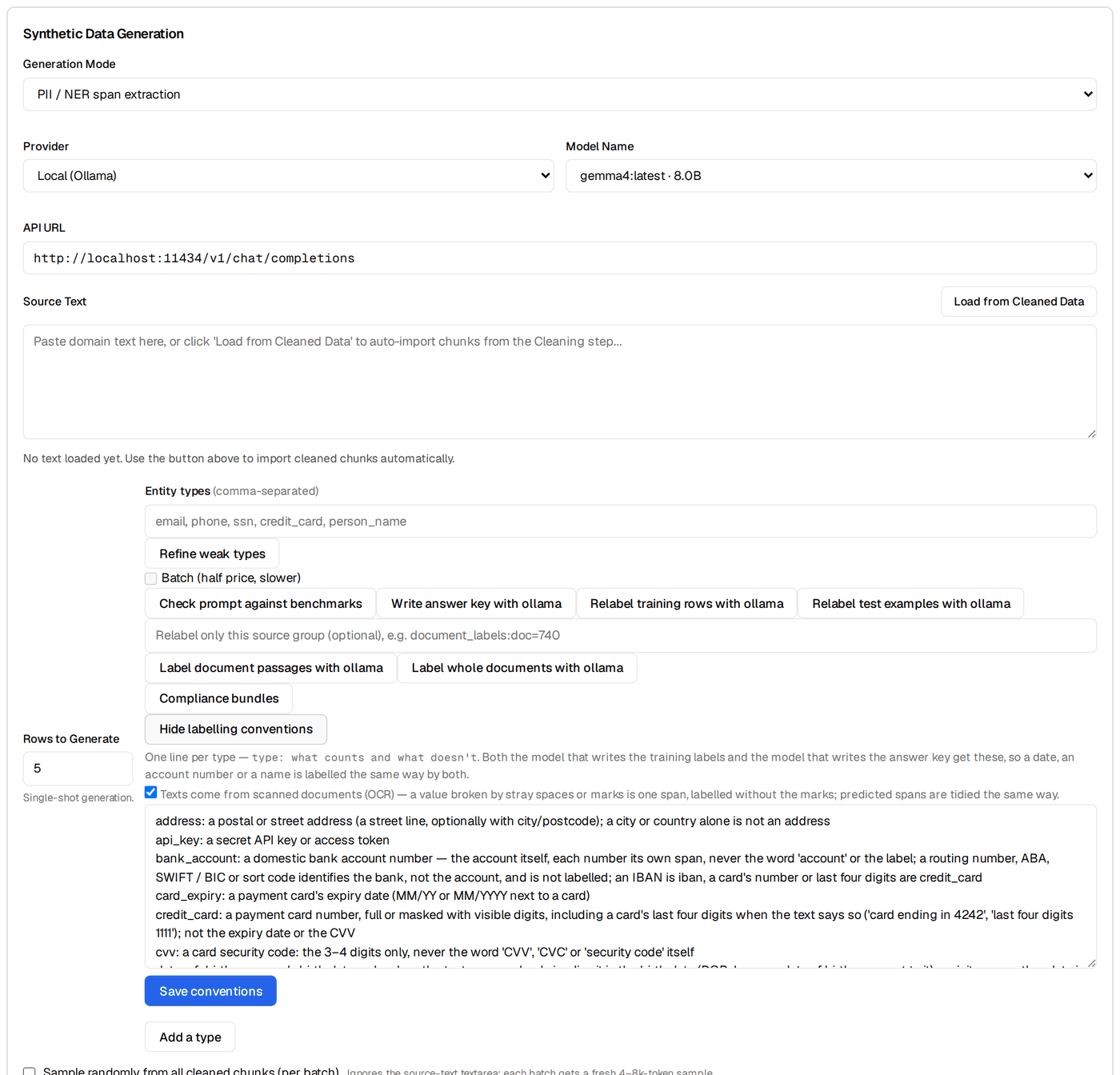
Open Data → Generate. Set Generation Mode to PII / NER span extraction, pick a Provider (Local (Ollama) is the free default; OpenAI / Anthropic / DeepSeek work with a key — Save key to this project keeps it) and Model Name, list your Entity types (EMAIL, PHONE, PERSON, ADDRESS, SSN, CREDIT_CARD, DOB) and set Rows to Generate. The playbook cards are under Details → Playbooks: run Hard negatives first with a target of 60. Generation runs as a background Job; the notification bell tracks progress.
Because the mode is PII / NER span extraction, this step also carries the span tools: Refine weak types (fills the entity types with the ones the last evaluation scored worst and sizes the batch), Write answer key with <model> (a second model labels the test examples as the answer key — see the evaluate section), Relabel training rows / test examples with <model>, Label document passages / whole documents (for text that came in as documents), Compliance bundles, the labelling conventions box (one line per type: what counts and what doesn't — both the training labeller and the answer-key writer read it) and Add a type (name + definition + optional regex).
Hard negatives first, paraphrase second, cluster-targeted last
Run Hard negatives first — that's where your precision lives. Review the output, then run Paraphrase positives as a recall extender. Hold Target a failure cluster in reserve for the second training round, once the eval has surfaced which entity type or carrier-shape is failing. Doing them in the wrong order means you'll be reviewing easy paraphrases while the hard negatives that actually move precision haven't been generated yet.
Faker stays in the loop for the synth step too. The generation model invents its own strings; for PII work keep the Source Text it works from synthetic (Faker-filled carrier text you paste in, or documents written by No documents yet? Write sample documents on Data → Sources), and spell out in the labelling conventions what each type does and doesn't cover ("a date next to 'born' is DOB; an invoice date is not"). That keeps the synth data PII-free at the source even when the generation model is a third-party API.
Review the synth queue
Every generated row lands pending in the Review queue (Data → Generate → Details → Review queue), grouped by the source that produced it. For span-tagging the per-row action is more nuanced than for classification — each row has zero-or-many spans, and any one of them can be wrong. The platform groups rejected rows by reason; use these tags:
false-positive— the synth produced a span that shouldn't be tagged at all (e.g. tagged "May" as PERSON). Soft-reject; useful as a hard-negative seed for the next playbook round.false-negative— the synth row contains a PII span that wasn't tagged (e.g. an email in the carrier text that the teacher missed). Soft-reject; flag for hand-fixup.wrong-label— the span was found, but tagged as the wrong entity type (e.g. an email got tagged as PERSON because the carrier sentence said "Email Sarah at sarah@example.com" and the teacher conflated). Soft-reject; tag for review.offset-drift— the span's start/end don't match its text (e.g.startis off by one because the teacher counted a leading space). Soft-reject; the platform's import validator usually catches this but synth output sometimes slips through.
Per-row actions:
- Accept — the row joins training on the next split. For PII specifically: only accept if you've eyeballed every span in the row. A row with three correct spans and one wrong-label span is a poisoned row; either fix the wrong label inline or soft-reject the whole row.
- Reject (soft) — the row stays on disk with the reason tag, available for audit.
- Purge this reason — a reason-grouped bulk delete. Once a category is genuinely bad (say all 12
offset-driftrows are wrong), expand the rejected group for that reason and purge it. The platform's "rejected rows are selectable + bulk-droppable" pattern matters here — never all-or-nothing.
Expect to reject 30-50% of generated hard-negative rows on the first pass. The acceptance rate climbs as you tune the playbook prompt and the teacher learns the conventions.
Training configuration
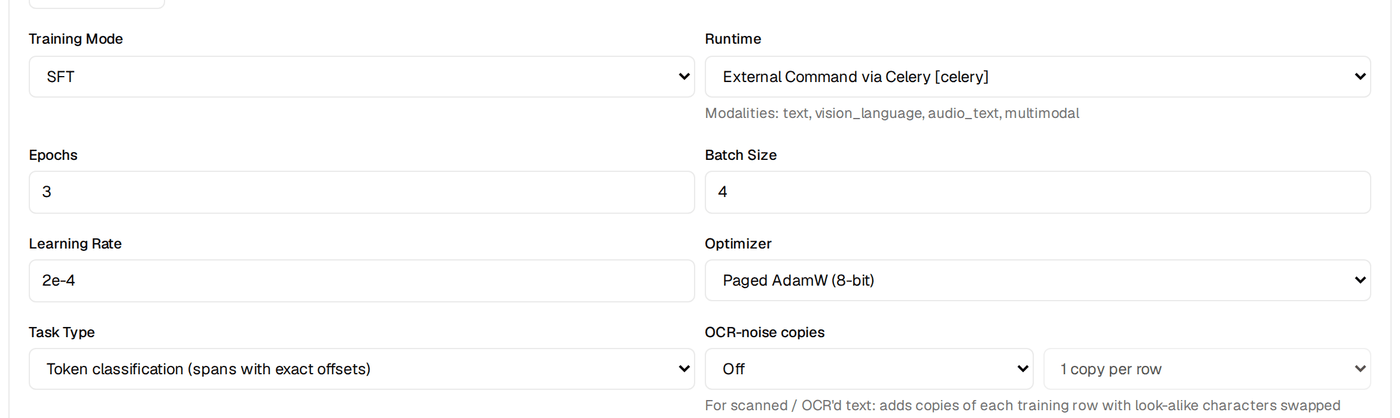
Open Train. The whole thing is one form — Base model (+ Browse), Task (read-only, Change), Seeds (One run / Three seeds), Run name, a readiness line and the Train button, which opens a confirm dialog with the resolved config before Launch. Everything below lives under More options: epochs, batch size, learning rate and Task Type under Model and hyperparameters, the LoRA fields under LoRA and advanced training. The span-extraction defaults are sensible:
- Base model
HuggingFaceTB/SmolLM2-135M-Instruct. Small, instruction-tuned, runs on consumer hardware and emits the JSON-array output cleanly. Alternative:Qwen/Qwen2.5-0.5B-Instructfor slightly better quality on longer carrier text (chats over ~200 tokens).- Task Type
- More options → Model and hyperparameters → Task Type. Causal LM is the path this tutorial describes: the model writes the entity JSON. Token classification (spans with exact offsets) trains an encoder tagger instead (pair it with a DeBERTa / BERT-class base model): per-token labels, exact offsets by construction, per-type thresholds and recall floors you can tune after the run, and a Try redaction box on Results. For a production redactor it is the stronger choice — the sensitive-data detector write-up walks that path from zero.
- Adapter
- LoRA, rank 16, alpha 32. Leave target modules on
auto— for a model this size it resolves to all linear layers, which fits better thanq_proj,v_projalone. Standard for SmolLM2 on structured-output tasks. - Learning rate
- 2e-4. Same as T1/T2; LoRA tolerates this rate.
- Epochs
- 4. Span tagging usually needs one more epoch than classification because the model is learning a structured JSON output, not a single label. (Leaving the field alone lets the app size epochs to your row count; typing a number switches that off.)
- Batch size + gradient accumulation
- Batch 4, accumulate 4 → effective batch 16. PII carrier text tends to be 100-300 tokens; the per-step memory footprint fits well under 8 GB.
Expected runtime: 8-20 minutes on a single GPU (RTX 3060 or better), 20-45 minutes on CPU. The runs list under the form shows live loss + a sparkline and a Cancel button for the running run; if loss isn't dropping after the first 100 steps, cancel and check your data — usually it's a span-offset integrity issue that the import validator didn't catch.
✓ Checkpoint: on Train, your run's row in the runs list shows a live sparkline that drops from ~2-3 in the first few steps down to ~0.4-0.6 by the end. The bell shows the training Job with a percentage. When it completes, the automatic lift check scores the run and Results → Verdict shows the summary card — the lift against the base model, or, for a token-classification run, "Span F1 x against the answer key" with the weakest types and Tune thresholds — plus Evaluate this run / Re-evaluate buttons.
Read the trainability forecast
Before kicking off a real training run, the platform pre-computes a trainability forecast: given your current data + answer key + base model, what's the predicted F1 / pass rate? It lives under Train → More options → Plan and gaps ("Predicted gate-pass: ~N%", next to the config-gap scanner); the goal ledger on Data → Sources → Details → Readiness overview shows the same number as its predicted_pass row.
For PII tagging — a high-recall use case — you want:
- Predicted pass probability ≥ 70%. Lower means your rare-class data is too thin; back-fill SSN / credit-card / DOB before training.
- Data ready = met with every entity type ≥ 30 spans in the answer key. Below that, the model can't learn the linguistic context for the starving class.
- Goal ledger's
gold_setrow at ≥ 100%. The span-extraction scaffold defaults to 100 answer-key rows; for PII with 6-7 entity types you'll want 200-300 to give the rare classes enough signal.
If the forecast is below 50%, the eval is almost certainly going to fail the per-entity recall floors. Spend the extra hour back-filling rare-class rows instead of training. The single biggest predictor of a successful PII tagger is per-entity coverage in the answer key, not the training hyperparameters.
Evaluation: per-entity recall floors are the point
After training, the automatic lift check scores the run and Results → Verdict shows the Pass/fail rules card (the rule set, PASS/FAIL, which required rules failed) above the summary. The span-extraction scaffold ships with these default rules:
- min_span_set_f1 ≥ 0.65
- Headline F1 averaged across all entity types and rows. The starting threshold for a usable tagger; below this the model is broken at the basic shape.
- min_span_set_precision ≥ 0.70
- Across all entity types, fraction of predicted spans that match a gold span (with exact offset + label).
- min_span_set_recall ≥ 0.60
- Across all entity types, fraction of gold spans that the model recovered. The starting threshold; for PII you'll override this per-entity (see below).
- safety pass rate (optional)
- Hooks the existing safety eval handler; useful when the tagger is deployed alongside a chat surface where the safety handler also runs.
For PII tagging, override the uniform recall floor with per-entity floors. On a token-classification run this is built in: Results → Verdict → Tune thresholds opens a floors editor (per type, 0–1, with Use compliance suggestions — PCI / HIPAA 0.95, GDPR / CCPA 0.9) and tunes the per-type decoding thresholds on the validation split so each floored type keeps its recall; the result table shows recall and precision before → after and whether each floor was met. To make a floor fail the run, add a rule on Results → Failures → Scaffolded pass/fail rule set → + Add rule (the Metric dropdown lists the standard metrics and per-class groups once an eval has reported them; mark it Required, Save), or edit the pack JSON and pick it in the eval-pack picker on the same tab. A starting policy:
| Entity type | Min recall | Min precision | Why |
|---|---|---|---|
| SSN | 0.98 | 0.90 | Missing one SSN is a compliance incident; false-positives are cheap (one false flag, one human reviews, easy) |
| CREDIT_CARD | 0.98 | 0.90 | PCI scope. Same reasoning. |
| 0.92 | 0.92 | High frequency, well-formed; both sides should be tight | |
| PHONE | 0.90 | 0.85 | Format variation hurts recall; OK to err on the side of over-flagging "555" strings |
| ADDRESS | 0.85 | 0.80 | Span boundaries are inherently fuzzy ("123 Main St" vs "123 Main St, Apt 4B"); allow more slack |
| PERSON | 0.85 | 0.85 | High false-positive cost (May / Pat / Will as words); precision floor matters more than recall here |
| DOB | 0.85 | 0.80 | Date format ambiguity (is "03/14" a DOB or an invoice date?) limits achievable precision |
The Pass/fail rules card on Results → Verdict names the required rules that failed, and the scorecard under it lists every rule with its value and threshold so you can see exactly which entity type is failing which floor — "EMAIL recall 0.94 / ≥ 0.92 passed, SSN recall 0.91 / ≥ 0.98 FAILED, PERSON precision 0.81 / ≥ 0.85 FAILED."
Why recall matters more than precision for PII
If your tagger has 0.95 recall on SSNs and 0.95 precision, you miss 5% of SSNs and you falsely flag 5% of non-SSN strings as SSNs. Those are not equally bad. The 5% false-positives just send a non-SSN to the redactor's review queue — one human glances at it and approves. The 5% false-negatives let real SSNs through to the third-party API — that's a compliance incident, a breach notification, a hit on your trust report. For PII tagging the asymmetry is real and large; bias your gates toward recall, especially on the rarest, costliest entity types.
When the eval fails
Common PII-specific failure patterns and the fix for each:
| Symptom | Root cause | Fix |
|---|---|---|
| EMAIL recall 0.94 on well-formed emails, 0.20 on obfuscated ones ("alice at example dot com") | Answer key and training rows are dominated by well-formed Faker emails; the model never learned obfuscation | Generate 30+ obfuscated-email rows via Target a failure cluster. Phrasings: "at … dot …", "[at]", "(at)", spaces around the @, full-words ("at gmail dot com"). |
| PERSON precision 0.78 — model flags May, Pat, Will, Iris in non-name contexts | Hard negatives too few — model treats every Title-Case word as a PERSON | Run Hard negatives with 80+ rows targeting common-name-as-word cases. Each generated row puts a name-shaped token in a non-name context. |
| PHONE recall 0.92, DOB recall 0.55 | Date format ambiguity — the model is confident on phones but DOBs are everywhere and look like other dates | Add more DOB-disambiguating context to gold. "born on 03/14/1989" → DOB; "invoice dated 03/14/2024" → not DOB. The carrier sentence shape is the signal. |
| Model conflates ORG and PERSON ("Acme Corp" tagged as PERSON) | Title-case proper-noun bias; ORG was not in your label vocabulary so the model overloads PERSON | Either add ORG to your vocabulary explicitly OR add hard-negative gold rows that pair organisation names with the empty-entity label. |
| F1 strong on test set, recall drops on the realistic eval set | Train/test data is Faker-templated and looks too uniform; production text has more noise | Capture realistic-shape unlabeled rows from your sanitised corpus, hand-label 30, evaluate against that as a separate held-out set BEFORE shipping |
| Every entity type fails the recall floor by 5-10 points | Answer key too small overall; per-entity row counts under 30 | Back-fill with more Faker-templated rows across all types before running another training round. The trainability forecast flagged this — the eval is just confirming. |
The failure clusters live on Results → Failures; when the reroute recommendation there fires, expand its "Why this fired?" disclosure to see the actual numbers rather than just the recommendation verb. Each cluster carries a Generate N rows from this cluster control — that is Target a failure cluster, pointed at the cluster, and the way to seed the next round.
Ship as a pre-API redactor — explicit review required
Once the pass/fail rules pass (with the per-entity recall floors satisfied), ship the tagger inside an explicit-review redaction pipeline. Three steps:
- Export the model. Open Ship → Package → New export: pick the run, a Format (HuggingFace for the weights — a LoRA run is merged into its base at export, so the folder loads with plain
transformers; GGUF (CPU) for llama.cpp / Ollama; ONNX, TensorRT-LLM, Docker), quantization and deployment targets, then Run Export. The export appears in the Releases table and underdata/projects/<id>/exports/with its manifest and release notes. Options → Compress on the same stage merges and quantizes first if you want a smaller artifact. - Deploy. Ship → Deploy holds the serve / deploy plans for the targets you ticked (a Docker export bundles a
serve.pyand Dockerfile; a GGUF export runs under the Ollama Runner target; Managed vLLM API is a plan you provision yourself), and Ship → Publish pushes a completed HuggingFace export to the Hub. Whatever serves it, wrap it in a thin/tagservice that sends the text, parses the entity JSON and enforces the schema — latency is typically 20-80 ms on a single GPU, 100-300 ms on CPU. - Wire it as a pre-API redactor with audit logging. The tagger's output drives a downstream redactor that:
- Produces a redacted copy of the text — spans replaced with type-named placeholders (
[EMAIL_1],[PERSON_1],[SSN_1]) or hashed / Faker-pseudonymised. - Keeps the original alongside the redacted copy, with an audit-log entry that records: timestamp, source surface, entity-type counts, the redacted token map, and the operator/policy that authorised the redaction.
- Never auto-destroys the original without a human or a policy gate having reviewed the audit entry. The retention window for originals is your compliance team's call (typically 30-90 days); after that, the originals are purged but the audit entries persist.
- Produces a redacted copy of the text — spans replaced with type-named placeholders (
Auto-redaction without an audit log is the anti-pattern
The temptation, especially when this ships, is to wire the tagger directly into the outbound pipeline and have it redact-and-destroy in one step. Don't. Every false-positive your tagger emits permanently corrupts a piece of text that may have been important — a customer's name in a support ticket gets replaced with [PERSON_1] and the original is gone. Worse, every false-negative is silent; you never know the tagger missed a span until somebody downstream finds it. The audit log is what makes the system auditable: when the compliance team asks "what did you redact last quarter?", you can answer with examples. When they ask "are you sure you didn't miss anything?", you can answer with the false-negative rate from your held-out realistic eval set. This pattern is the platform's safety rule for this surface — explicit review before destruction.
Smoke-test on Results → Try it. Open Results → Try it (/project/<id>/results?tab=try), set Provider to Trained run (this project) and pick your run — it loads in-process, no export needed. Paste 10 realistic-shape (but synthetic) text samples; check that each PII span gets the right type and the right offsets, and that the empty-entity rows return empty. The per-turn footer (which run served the reply, the latency) is your sanity check; a token-classification run also gets the Try redaction box (Mask / Tag / Spans only) so you can see the redacted text directly before you wire the tagger into a production redaction pipeline.
What's next
You have a deployed PII tagger sitting in front of your outbound API surface, with per-entity recall floors that match the cost of each entity type, and an explicit-review redaction pipeline that never destroys an original without an audit trail. Three obvious next moves:
- Extend the entity vocabulary
- Add passport numbers, IBAN, bank routing numbers, custom enterprise IDs (employee IDs, account numbers, internal customer IDs). Faker generates many of these directly; for the enterprise-specific ones, write a small synthetic generator that mirrors your real ID format and use it as a Faker substitute.
- Tune per-compliance-regime
- GDPR, CCPA, and HIPAA have different definitions of PII / PHI. GDPR considers IP addresses personal data; CCPA scopes "personal information" more broadly than GDPR; HIPAA adds the 18 HIPAA Safe Harbor identifiers. Build one trained adapter per regime if you serve customers under different jurisdictions, OR build one adapter with the union of all entity types and apply per-regime filtering at the redactor layer. The latter is cheaper to maintain.
- Retrain quarterly as new PII shapes emerge
- New chat-style obfuscations, new phone formats (international expansion), new internal identifier shapes. Capture failure-cluster examples from production (audit log review surfaces these for free), add them to the answer key and the training rows, retrain when the key grows by ~100 rows. The post-eval decision engine will flag when the new data has shifted the optimal architecture; usually it hasn't — span-extraction is the right shape for the long run.
That's the tutorials series mainline — recipe-grounded, end-to-end, deployment-ready. For more tutorials covering other recipes (code review, summarisation, generic SFT), head back to the tutorials hub.
Key terms
- span-extraction recipe
- BrewSLM recipe (task type Structured Span Extractor) that trains a small model to find and label spans inside text. Output is a JSON array of
(type, start, end, text)objects. Same recipe powers invoice extraction (closed-set, one of each type) and PII tagging (open-set, zero-or-many of each type). - Open-set vs closed-set tagging
- Open-set: the number of spans per row is unbounded (PII). Closed-set: a fixed shape of one-of-each-type (invoice extraction). Same scorer; different failure-mode profile.
- Per-entity recall floor
- An eval gate that requires recall on each entity type to meet a minimum threshold individually. For PII: SSN and credit-card sit at 0.98 because missing one is a compliance incident; PERSON and DOB at 0.85 because the FP cost on those classes is higher.
- Hard negative (PII flavour)
- A string that looks like a PII span but isn't. "May" in "May 2024", "555" in "555 5th Avenue", "Pat" in "Pat the dog". Hard negatives teach the model linguistic context, not just pattern matching.
- Explicit-review redaction
- The deployment pattern this tutorial recommends: tagger emits spans, downstream pipeline produces both a redacted copy and an audit log, no original is destroyed without a human or policy gate having reviewed the audit entry. Auto-redaction without an audit log is the anti-pattern.
- Faker
- Python library that generates realistic-looking but synthetic PII. The canonical source-of-truth for "I need PII-shaped strings I can legally train on."
Check yourself
Answers are saved to this browser.